安装说明
安装 Wansan Studio
Section titled “安装 Wansan Studio”Wansan Studio 支持 Windows 和 macOS 系统。
macOS 安装
Section titled “macOS 安装”打开 .dmg 并将 Wansan Studio 拖入 Applications 文件夹。
🛠 常见问题:提示“应用已损坏”?
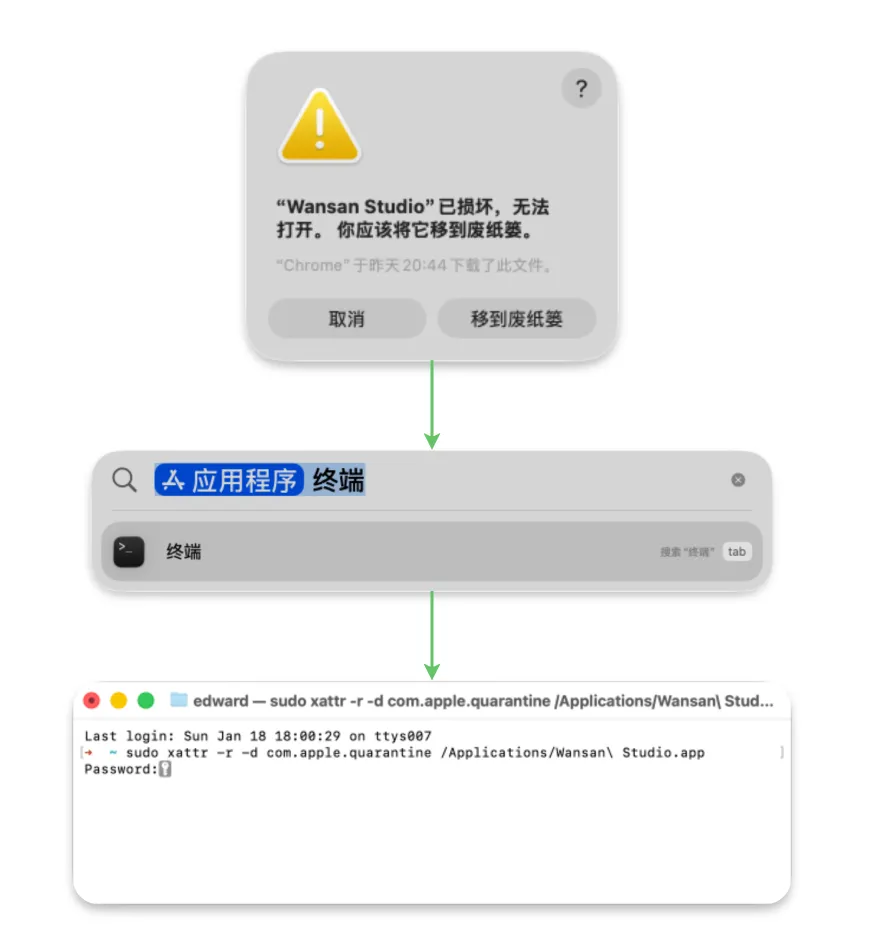
Section titled “🛠 常见问题:提示“应用已损坏”?”在 macOS 上打开 Wansan 时,如果您看到 “Wansan Studio 已损坏,打不开” 的警告,请不要担心,这通常不是应用本身的问题。
为什么会这样?
Section titled “为什么会这样?”这是 macOS 的 Gatekeeper 安全机制导致的。目前 Wansan Studio 处于测试阶段,暂未进行 Apple 官方认证。我们将在正式版发布时完成相关的公证 (Notarization) 流程。
解决方案:使用终端一键修复
Section titled “解决方案:使用终端一键修复”如果系统提示损坏,请按照以下步骤操作:
- 打开 终端 (Terminal)。
- 复制并粘贴以下命令(注意末尾有一个空格):
sudo xattr -r -d com.apple.quarantine /Applications/Wansan\ Studio.app - 按回车键,并输入您的开机密码确认。
- 重新启动 Wansan 即可正常运行。
Windows 安装
Section titled “Windows 安装”- 下载
.exe安装程序。 - 双击运行。如果弹出 Windows Defender 提醒,点击 “更多信息” -> “仍要运行”。
- 按照提示完成安装,桌面将自动生成快捷方式。
- 内存: 至少 4GB (推荐 8GB 以上)。
- 存储: 约 500MB 安装空间 (包含本地数据库引擎)。
- 系统: macOS 12+ (Monterey) 或 Windows 10+。